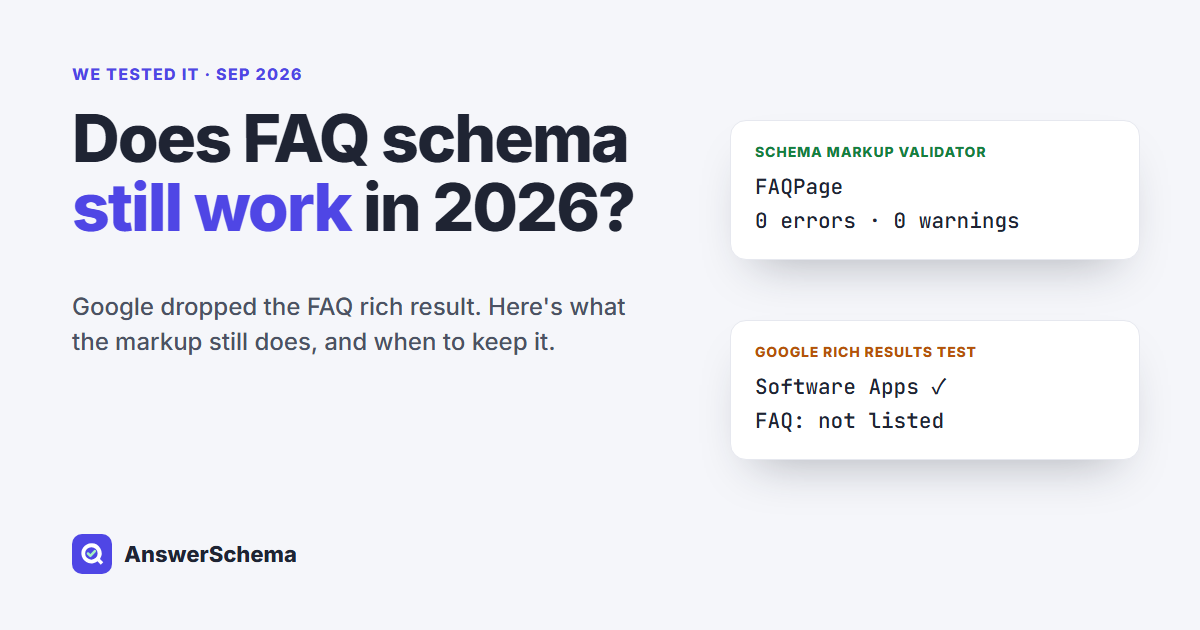
Short answer: Yes, FAQ schema still works as valid structured data, but it no longer does the job most people added it for. Google stopped showing FAQ rich results on May 7, 2026, and in our test its Rich Results Test did not list FAQ items at all. The markup still validates, still describes your page to other systems, and, according to Google, causes no problems for Search if you leave it in place.
We checked this on our own live site on September 18, 2026. The same page passed one validator with zero errors and was ignored for FAQ by the other. Below is what changed, what we saw, and a five-minute way to check your own site.
What happened to FAQ rich results?
Google removed FAQ rich results in two steps. In August 2023 it limited the expandable FAQ snippets to well-known government and health sites. In May 2026 it switched them off for everyone and announced that its supporting tools would lose FAQ support in June and August 2026. If your FAQ dropdowns vanished from search results years ago, the 2023 change is the reason, not the 2026 one.
| Date | What changed | Source |
|---|---|---|
| Aug 8, 2023 | FAQ rich results limited to “well-known, authoritative government and health websites” | Google Search Central Blog |
| May 7, 2026 | FAQ rich results no longer shown in Google Search | Search Central changelog |
| June 2026 (announced) | Google said it would drop FAQ support from the Rich Results Test, the Search Console rich result report and the search appearance filter | Search Engine Journal |
| Aug 2026 (announced) | Google said FAQ data would be removed from the Search Console API | Search Engine Journal |
Google’s Search Central changelog now says the FAQ rich result feature “is no longer shown in Google Search results.” Nothing in that notice tells you to delete the markup.
What does FAQ schema still do in 2026?
FAQ schema still does three things in 2026. It stays a valid schema.org type that any parser can read. It describes your questions and answers in a clean, labeled format. And, according to Microsoft, structured data helps its language models understand pages. What it no longer does is change how your page looks in Google.
- It is still valid. FAQPage is an active schema.org type, and the Schema Markup Validator checks it like any other type.
- Leaving it in is safe. In 2023 Google wrote that “there’s no need to proactively remove it” and that “structured data that’s not being used does not cause problems for Search.”
- Bing says schema helps its AI read pages. In March 2025, Microsoft’s Fabrice Canel said at SMX Munich that schema markup helps Microsoft’s large language models understand content, as reported by Search Engine Roundtable.
- Google says it is not required for AI features. Google’s guide to generative AI features says structured data “isn’t required for generative AI search, and there’s no special schema.org markup you need to add.”
Put those together and the honest position is simple. FAQ schema is a tidy label for content you already have. We have not found a published test showing that it raises rankings or citations in AI answers. Be wary of any article that promises otherwise without showing a test.
What did we see when we tested a live page?
We ran the answerschema.com home page through two free tools on September 18, 2026. The page carries one FAQPage block with seven questions, plus WebPage and SoftwareApplication markup. The two tools gave very different answers about the same code.
SoftwareApplication: 0 errors, 0 warnings
FAQPage: 0 errors, 0 warnings
7 Question items read
Software Apps: 1 valid item
FAQ: not listed
(same page, same markup)
This is the part that confuses site owners. If you paste your URL into Google’s Rich Results Test today and see no FAQ item, that alone does not mean your markup is broken. Google announced in May 2026 that it would drop FAQ support from this tool, as Search Engine Journal reported, and in our September test it no longer listed FAQ at all. To confirm the markup itself is correct, use the Schema Markup Validator instead.
Should you remove FAQ schema from your site?
For most sites, no. The best public test we found points the same way. In a November 2024 split test on e-commerce product listing pages, SearchPilot found that removing valid FAQ schema “had no statistically significant impact on organic traffic.” Keep it if it is clean, and fix it if it is not.
Use this quick checklist:
| Situation | What to do |
|---|---|
| FAQ answers are visible on the page and the markup validates | Keep it. No action needed. |
| The page has two or more FAQPage blocks (for example, your SEO plugin and a page builder both add one) | Fix it. Turn one source off so the page has a single FAQPage. |
| The markup describes questions that readers cannot see | Fix or remove it. Google’s guidelines say: “Don’t mark up content that is not visible to readers of the page.” |
| The FAQ was stuffed in only for the old snippet and adds nothing for readers | Rewrite or remove the whole FAQ section, not just the markup. |
| Maintaining the markup is causing errors or slowing your team down | Removing it is fine. Google says unused markup has no visible effect. |
How can you check your own FAQ schema in five minutes?
You can check any page with two free steps and no plugin. First, run the URL through the Schema Markup Validator and look for FAQPage with zero errors. Second, paste the short snippet below into your browser console to count how many FAQPage blocks the page outputs.
- Open the page you want to check in a desktop browser such as Chrome.
- Press
F12(or right-click and choose Inspect), then open the Console tab. - Paste the code below and press Enter.
[...document.querySelectorAll('script[type="application/ld+json"]')]
  .flatMap(s => { try { const d = JSON.parse(s.textContent); return [].concat(d['@graph'] || d); } catch (e) { return []; } })
  .filter(x => [].concat(x['@type']).includes('FAQPage'))
  .map(x => (x.mainEntity || []).length)
The result is a list with one number per FAQPage block, and each number is the count of questions in that block. On our home page it returns [7]: one block, seven questions. An empty list [] means the page has no FAQPage in its JSON-LD. The snippet does not read microdata or RDFa, so check those pages in the validator. Two or more numbers, such as [5, 5], mean duplicate FAQPage blocks, a problem raised in this WordPress.org support thread, among others. We later built a page with that duplicate on purpose and measured it: what duplicate FAQ schema costs in 2026.
Chrome may block pasting into the console at first. If it does, the console shows a short phrase to type before pasting; type it, then paste again.
What matters more than the markup now?
The visible questions and answers matter more than the JSON-LD around them. A reader, a search engine or an AI assistant can only use an answer that is on the page and makes sense on its own. That was true before May 2026, and it is the part of your FAQ that still pays off now.
- Ask the question people actually type. Pull wording from your support emails, community forums and the related questions shown in search results, not from your product brochure.
- Answer in the first sentence. Start with “Yes,” “No,” or the direct fact, then explain.
- Keep each answer self-contained. Avoid “as mentioned above.” Someone who sees only that one answer should still understand it.
- Add one concrete detail. A date, a number, a setting name or a step makes an answer more useful than a general claim.
- Keep it current. An FAQ that still promises “rich snippets in Google” is now wrong and costs you trust.
Where does AI FAQ Schema fit?
We built AI FAQ Schema, a free WordPress plugin, around the parts that still matter. It shows a visible FAQ block and outputs FAQPage JSON-LD from the same content, so the markup matches what readers see. Its SEO and GEO scores flag answers that don’t start with a direct response. It works without an API key. It will not bring back the FAQ snippet, and we won’t pretend it does. If you are also deciding which AI crawlers may read your site, see our guide to blocking AI training while allowing AI search.
FAQs
Does FAQ schema still work in 2026?
Yes, as valid structured data. FAQPage is still an active schema.org type and validates without errors. What stopped working is the Google FAQ rich result, which Google switched off on May 7, 2026, so the markup no longer changes how a page looks in Google Search.
Why doesn't Google's Rich Results Test show my FAQ schema?
Google announced in May 2026 that it would drop FAQ support from the Rich Results Test, as Search Engine Journal reported, and in our September 2026 test the tool listed no FAQ items. A missing FAQ item there does not mean your markup is broken. Check it with the Schema Markup Validator at validator.schema.org, which still reads FAQPage and reports errors and warnings.
Should I delete FAQ schema from my WordPress site?
No, not if it is valid and matches visible content. Google has said unused structured data does not cause problems for Search, and a November 2024 SearchPilot test found removing valid FAQ schema had no statistically significant effect on organic traffic. Fix duplicates or hidden content instead.
Does FAQ schema help my site get cited by ChatGPT or AI Overviews?
We have not found a public test showing that it does. Google says no special markup is needed for its AI features. Microsoft said in March 2025 that schema helps its language models understand content. Clear, self-contained answers on the page are the part you can rely on.
How do I find duplicate FAQ schema on a page?
Run a short script in your browser console that counts FAQPage blocks in the page's JSON-LD. One number means one FAQ block in JSON-LD. Two or more numbers mean duplicates, for example when an SEO plugin and a page builder both add FAQ schema to the same page.